Intercom Fin vs Amendary: Article Maintenance
Intercom Fin suggests content to fix where its AI agent could not answer. Amendary fixes the articles a release made wrong. The two start from different signals. Facts about Intercom Fin below are as of 21 October 2026, from the public pages listed at the end.
What Intercom Fin does
- Content gap recommendations: Fin scans conversations it could not resolve, compares them with human replies, and suggests fixes where help content is missing, unclear, duplicated or contradictory. Fixes are ranked by impact.
- You find them in Fin AI Agent, then Analyze, then Recommendations, filtered by content gaps.
- You can edit a recommendation before accepting it. An article change is saved as a draft or published. A snippet is added to Fin's knowledge when accepted.
- Intercom says you need its Pro add-on to use Recommendations and other AI insights.
Pick Fin's recommendations if your main goal is better answers from Fin, and unresolved conversations are your best signal of what is missing.
Where Amendary differs
- Change-driven. Amendary starts from what shipped: a commit, a GitHub release, a tag or a dated entry in your public changelog. It finds the articles that change made wrong and shows the evidence next to each fix. See What shipped.
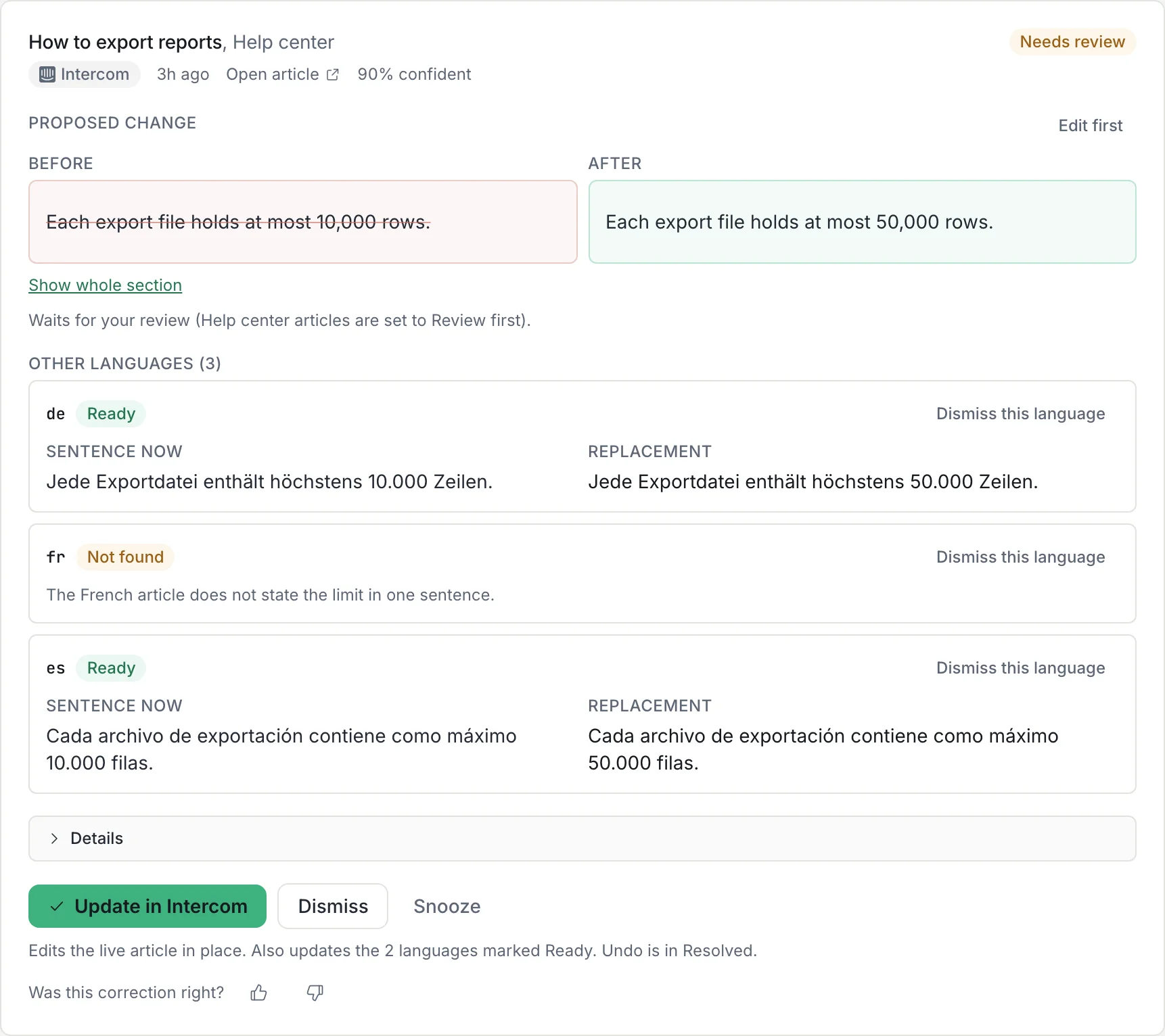
- Every language. In GitHub, Zendesk and Intercom, a source correction can be carried into existing translations. Notion pages are checked individually. Code checks that every number, version, URL and name is kept, and holds any language it cannot prove. See Languages.
- Keeps your current help center. Amendary edits the articles you already have in Notion, GitHub, Zendesk Guide or Intercom Articles, in place. It does not host a help center or ask you to move. Published articles stay published.
- Review and undo. New teams start on Review first. An applied fix can be undone for 30 days. See Review and undo.
- Flat price. From 39 euro a month per workspace, or free with your own Anthropic key. See the pricing page.
Side by side
- Starts from
Intercom Fin: Unresolved Fin conversations and the replies your team gave.
Amendary: What shipped: commits, releases, tags or your public changelog, matched to the articles they made wrong.
- Goal
Intercom Fin: Better answers from Fin: fill gaps and fix unclear or conflicting content.
Amendary: Articles that match the product after each release, in every language.
- Languages
Intercom Fin: The page we read does not describe how a fix reaches translated articles.
Amendary: One approval carries a fix into every translation your plan covers, held per language when a value does not match.
- Price
Intercom Fin: Fin AI Agent is $0.99 per outcome. Intercom seats are $29 (Essential), $85 (Advanced) and $132 (Expert) per seat per month. We could not find a price for the Pro add-on.
Amendary: Flat per workspace from 39 euro a month, or free with your own Anthropic key. Not per outcome or per seat.
- Where it works
Intercom Fin: Intercom Articles and snippets, inside Intercom.
Amendary: Your existing Intercom Articles, in place, in US, EU and Australia workspaces. Notion, GitHub and Zendesk Guide too.
Review a correction in Amendary
What we did not check
We could not find the price of the Pro add-on, and the Intercom pricing page we read does not mention content suggestions. The Intercom help article does not say which help centers Recommendations support. Intercom also describes a Suggestions view under Train, and its navigation may differ in your workspace. Confirm details with Intercom.
Sources
- Intercom, Use AI-powered content recommendations to improve Fin, read on 21 October 2026
- Intercom pricing, read on 21 October 2026
See all integrations or the wider comparison on why Amendary.
Try Amendary with Intercom Articles
Connect Intercom Articles, choose the pages or articles to watch, and review proposed corrections with the change behind each one.
Free for 14 days with no card, and every edit waits for your review. Or free forever with your own Anthropic API key. Code is never touched.