Queue & reviews
A correction is Amendary's way of saying 'this page no longer matches what shipped'. Here is what goes into one, which ones apply on their own, and what happens next.
What is a correction?
When a release or code change looks like it affects something a mapped page says, Amendary drafts a correction: the section of the page that is now wrong, rewritten as it should read, and the evidence behind it. You see each section before and after, with how many blocks change, are added, or are removed, and can apply or dismiss each section on its own. Whether it applies on its own or waits for you depends on the review mode for the page’s audience (next question).
What does a correction look like?
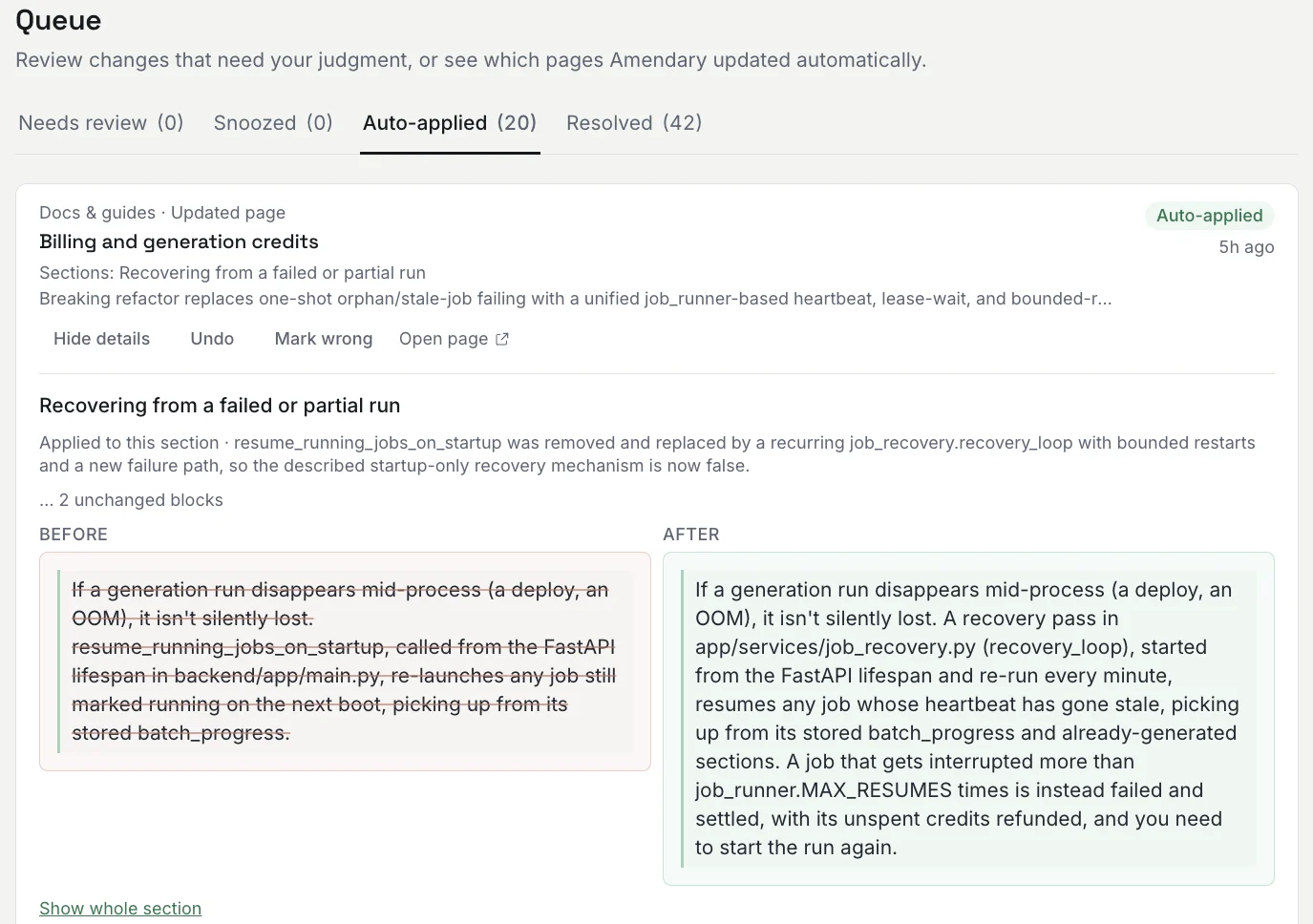
Review mode, auto mode, and the free trial
Review mode is set per audience on Settings > General, with one setting for Engineering docs and one for Help center. Product updates follow the Help center setting. New workspaces start on Review first for both: every correction waits in the Queue and nothing is written until a person applies it.
On a paid plan, an owner can set either audience to Apply automatically (auto mode). Corrections for that audience then apply on their own and show up under Auto-applied, unless one of these holds them for a person:
- it states a version, path or URL the change does not back up;
- it removes a value the change does not mention;
- it removes or shrinks content;
- it may replace an architecture decision record;
- it adds new text (an addition inside a rewritten section can still apply on its own when every value it adds is in the change and it removes nothing);
- it proposes a new page;
- no edit could be drafted or planned.
Bare numbers, names and a “Partial context” label never hold a correction on their own. They are shown as things to check.
The free trial is review-only: everything waits in the Queue, whatever the mode, until the workspace is on a paid plan. Trial length and limits are on the pricing page.
What does the confidence score mean?
The card shows it as a percentage: how sure Amendary is that the page needs updating. Corrections are only drafted above a set confidence, so you do not get a flood of maybes.
What is on each Queue tab?
- Needs review: corrections, product-update drafts, proposed new pages and diagram proposals waiting for a person. Under Review first and on the trial, every correction lands here.
- Snoozed: what you set aside, and when each one comes back.
- Auto-applied: corrections and product updates auto mode published.
- Resolved: what a person applied, published, undid or dismissed.
What is a diagram proposal?
A diagram Amendary designed for a Notion page, waiting for you. The card shows the image, each label and where it was found, and a link to the SVG. Add to page puts it on the page as an image; Dismiss drops it. Auto mode never adds a diagram. See Diagrams.
What happens when I apply one?
Each card says where the page lives (Notion, GitHub, Zendesk or Intercom), and the apply button says what will happen:
- Notion: Apply rewrites the section. When an edit cannot be placed safely, Amendary posts it as a comment instead.
- GitHub: Commit to GitHub or Open pull request, following the destination’s setting.
- Zendesk or Intercom: Update in Zendesk or Update in Intercom rewrites the live article’s body, in the source language and in each translation whose fix passed its checks. A published article stays published and a draft stays a draft.
If you edited the text first, your version is written. If the page changed since the correction was drafted, nothing is written and the card says so. Every applied change is in Activity, with the change that caused it and the text it replaced.
How do I undo a correction?
Open Auto-applied for an automatic correction, or Resolved for one a person applied, and select Undo next to the correction. Amendary checks that the block has not been edited since, then restores the stored original text. Undo is available for 30 days after a correction is applied, in every destination. For a Zendesk or Intercom article it writes the old text back, after the same check.
A correction was applied and it is wrong. What now?
Undo it, or if you have already fixed the page by hand, use Mark wrong next to Undo and say briefly why. Marking a correction wrong does not touch the page; it records the miss in the audit history and accuracy counts. It does not currently change the next correction automatically.
What happens when I dismiss one?
It is marked as not relevant and cleared from the Queue. There is no penalty for dismissing: if the correction did not apply, dismissing it is exactly the right move. You can say why (wrong page, wrong correction, not actually stale); the reason is recorded so you can track accuracy over time.
Can I deal with something later?
Yes, select Snooze and pick 1, 7 or 30 days. It moves to the Snoozed tab and comes back to Needs review when the time is up.
Where do corrections come from?
Three places: what shipped for a help center (a repo’s What counts as shipped, or each new entry on a changelog URL), the daily check of code changes for Engineering docs pages, and a one-time audit that runs right after you map a page. A preview requested through the API or MCP can add corrections too; those always wait for a person. Each correction shows where it came from.
Why wasn't my page updated when I expected it to be?
A few common reasons: the page is not mapped to the repo that changed, the page is set to “Checks paused”, or the change did not clear the confidence bar Amendary uses to avoid noisy, low-value edits. See Troubleshooting if something still seems off.
Try Amendary on your own help center
Connect Notion, GitHub, Zendesk or Intercom and pick the articles to watch. Your first check shows what Amendary would fix, with the change as proof.
Free for 14 days with no card, and every edit waits for your review. Or free forever with your own Anthropic API key. Code is never touched.