Intercom maintenance
Intercom articles: a release review checklist
Keep Intercom articles current after releases: find affected passages, review native drafts, check languages and test the answers before publishing.
Last checked:
To keep Intercom articles current after a product release, turn the shipped change into a list of claims to check. Find the affected articles, review the replacements and languages, then verify what customers can read. Keep changes for a future launch separate from corrections that need to go live now.
I would start with the release note and an existing article open beside it. The note may explain the new feature perfectly while the article still sends a customer through the old steps. The checklist below is about closing that gap, including the point where a saved edit actually becomes public.
Which Intercom article update workflow do you need?
Choose the workflow from the timing and amount of work. I would make that decision before drafting changes:
| Situation | My starting point | What to verify |
|---|---|---|
| One live instruction is wrong | A reviewed article edit | The customer can follow the corrected steps |
| Several articles change on launch day | A release draft | The new instructions stay out of the live version until launch |
| You need help finding affected content | Fin Operator, if available | Each suggested match and proposed replacement |
| Changes keep arriving from code or a changelog | Recurring checks on watched articles | The change applies to the article's readers |
Intercom documents public article edits and drafts, release drafts and testing, and Fin Operator's reviewable proposals. Operator requires the Pro add-on. Amendary's separate recurring workflow is described under daily checks.
If your current Intercom process already finds and resolves the changes reliably, I would keep using it. Add another tool when there is a specific maintenance job left undone.
What should you extract from the product release?
Record the old behaviour, new behaviour, affected readers and go-live condition. Keep the source link with that record. “Improved exports” is too vague to rewrite a procedure; ask the release owner which steps changed.
Here is an illustrative scenario. A product replaces an immediate CSV download with an export job. The customer requests the export, waits for it to finish and downloads it from Export history. The release says nothing about file retention or notification emails.
I would check the export procedure, onboarding checklist and troubleshooting article. I would not invent an expiry period or promise an email. Those might sound helpful, but they are separate claims needing evidence.
Also confirm availability. A merge, deployment and customer rollout can happen at different times. If only a beta group has the new export flow, a universal instruction would be wrong even if every step matches the new code. Keep the audience condition in both the review task and the article.
How do you find every article affected by the release?
Start with the task, then search its old wording. For the export example, I would look for “download CSV”, “export data”, “download starts” and “Export history”. Read the matches in context. An import guide may mention CSV without needing any change.
Fin Operator supports semantic search and proposed article updates from supplied release notes, with a diff for review. See Intercom's knowledge management guide. A narrow request makes it easier to judge the result. This is a prompt I would use with the actual release attached:
Find content that tells customers an export downloads immediately.
Use the attached release as the source for the new export workflow.
List each affected article and the passage that needs review.
Propose the smallest complete correction.
Preserve role and plan restrictions.
Do not add retention periods or notification promises the source omits.
Flag anything that needs the product owner's answer.
This is a review aid, not a guarantee that a search found every occurrence. Follow links from the main procedure and check the article where a customer would start. Keep a short list of pages checked and left alone so the next reviewer does not repeat the same search.
What should you check in a proposed article update?
Read the whole task once before accepting a sentence edit. In the export example, changing “Download” to “Request export” would leave the reader waiting without explaining where the file appears.
- Compare the proposed steps with the shipped behaviour for the intended account.
- Preserve prerequisites, permissions and plan restrictions unless the release changes them.
- Check the waiting step and the final result, not just the new button label.
- Read troubleshooting advice that assumes the old flow.
- Check screenshots and links separately from the text.
I would reject “Your file will arrive by email” in this example. The source does not establish that. I would also leave instructions for importing CSV files alone. The shared file format does not make importing part of the change.
If a reviewer cannot finish the task from the proposed article, the edit is incomplete. Keep that question with the draft instead of smoothing it over with more confident prose.
When do Intercom article changes become live?
Intercom's release FAQ distinguishes Publish to Fin Main from Save to Fin Main. Publishing makes changes live; saving does not. On articles, Save to Fin Main appears when Publish to help center is off. Fin availability is a separate setting, so check both the help-center audience and whether Fin can use the article.
For a coordinated launch, Intercom's release testing guide describes saving proposed changes to a release draft, testing there and publishing the release when ready. Changes held in that release leave the current live content in place.
I would give the release a name tied to the product launch and keep a list of the intended article changes. Before publishing, compare that list with the release contents. A correctly edited article left outside the release can still miss launch day.
If an urgent correction arrives while an article is staged, decide which version should receive it. Intercom warns that editing Fin Main separately can create a conflict with the release. Resolve it before publishing; see the release FAQ.
How do you check translations and Fin's answers?
Keep an outcome for each language: corrected and live, corrected draft, unchanged with a reason, or waiting for review. Intercom's translation guide describes separate language versions and publication indicators. Configuring a multilingual help center does not automatically translate its public articles.
For the export example, check that each version explains requesting, waiting and finding the finished file. A translated button name may need a different phrase from the source article. Have someone who knows that language check meaning and the labels the reader sees.
Then test the answer separately from the article. Intercom's release testing workflow uses Evals to compare answers in a release with Fin Main. I would include questions like these:
- Where do I download my export after requesting it?
- Why did nothing download when I clicked the export button?
- Can a member request an export, or does it require an owner?
Write the expected answer from confirmed product behaviour first. Keep an unanswered permission question visible until someone resolves it. A good result for one phrasing is useful evidence for that test, not proof that every answer is correct.
Where does Amendary fit after an Intercom release?
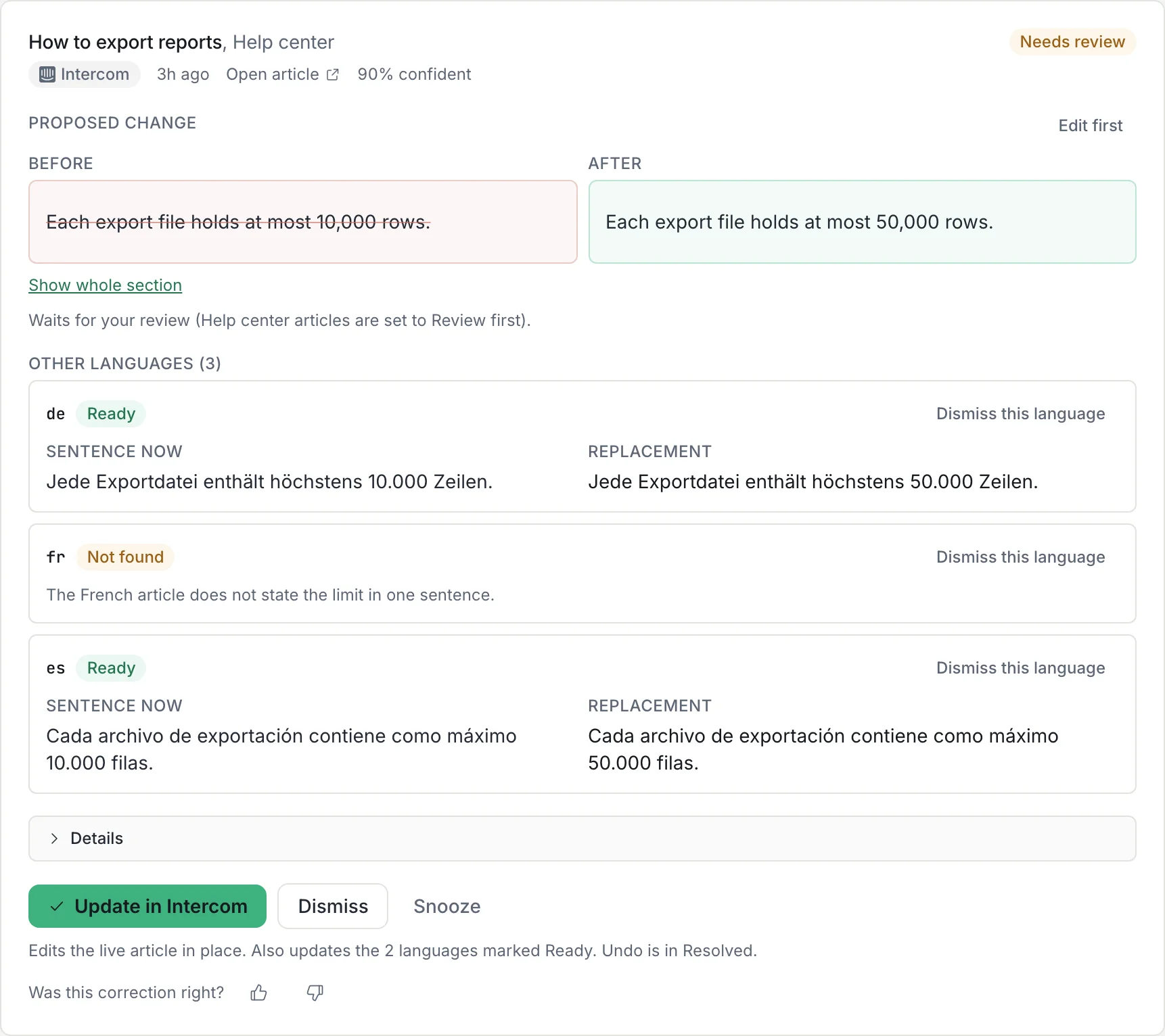
Amendary checks watched Intercom articles daily against a GitHub repo or public changelog and drafts corrections with supporting evidence. Existing translations get proposed fixes too. The Intercom workflow explains what is checked, and the setup walkthrough covers watching and reviewing articles.
Approval in Amendary writes ready corrections to the live article body while preserving each language's published or draft state. A conflicting live edit blocks the write. This is a direct correction workflow; it does not stage an Intercom release or run Fin Evals. Keep a future launch in Intercom's native release process until its instructions should be live.
Browse in Amendary lists published Intercom articles. Missing-language drafts are separate work, and screenshots still need a person. Check the integration details before choosing articles for a trial.
If you also maintain Zendesk, the Zendesk release checklist covers that review. For the distinction between posting release news and correcting an older guide, see GitHub and Notion sync. I would use the same question in both places: which existing instruction became false?
What else should you check before closing the release?
Do release notes replace an article update?
No. The release note explains what changed. The procedure still needs to describe the task a customer can complete today. Link them when useful, then check both independently.
Should every article be rewritten after a release?
I would review affected claims and leave accurate passages alone. A refactor may need no customer-facing edit. A changed workflow may need several steps rewritten, even when its feature name stays the same.
When is the review finished?
When each affected article and language has an explicit outcome, the intended live pages have been checked, and unresolved questions have an owner. If you use Fin, record the answer checks separately. An article update alone is not an answer-quality result.
Which sources were checked for this checklist?
Checked 29 November 2026: Intercom's linked public-article, Operator, release, testing and translation guides, plus Amendary's linked help and integration pages. The export scenario, prompt and test questions are illustrative, not a recorded product test or customer result. See pricing and trial limits before connecting your help center.