Zendesk maintenance
Keep Zendesk articles accurate after releases
A release-by-release checklist for finding outdated Zendesk Guide instructions, reviewing corrections and keeping translations aligned.
A release note tells you what shipped. It rarely tells you which help articles now give the wrong instructions. That gap leaves support teams hunting through Zendesk Guide, or waiting for a customer to point out the mistake.
The useful unit of work is a specific change and the articles it affects. Start there, keep the evidence beside the proposed correction, and follow it through every published language.
Start with the customer-visible change
Write down what a customer can do differently after the release. A changed retention period, renamed setting or removed workflow is useful evidence. An internal refactor may need no help-center update at all.
For example, imagine export history changes from 30 to 90 days. Keep the release note or code change that establishes the new limit. This is a made-up example; the same process applies to your actual release.
Find the instructions that depend on it
Search for the old value, the feature name and the task a customer is trying to complete. For export history, look beyond the export article: retention, downloading data and account limitations might all mention the old rule.
Read the surrounding paragraph before changing a match. A 30-day billing period is not an export-history limit. Search finds candidates; the meaning of each passage decides whether it needs a correction.
Review the smallest complete correction
Changing one number can be enough. A removed workflow may need a larger rewrite. The goal is a correct instruction, not a fixed number of words.
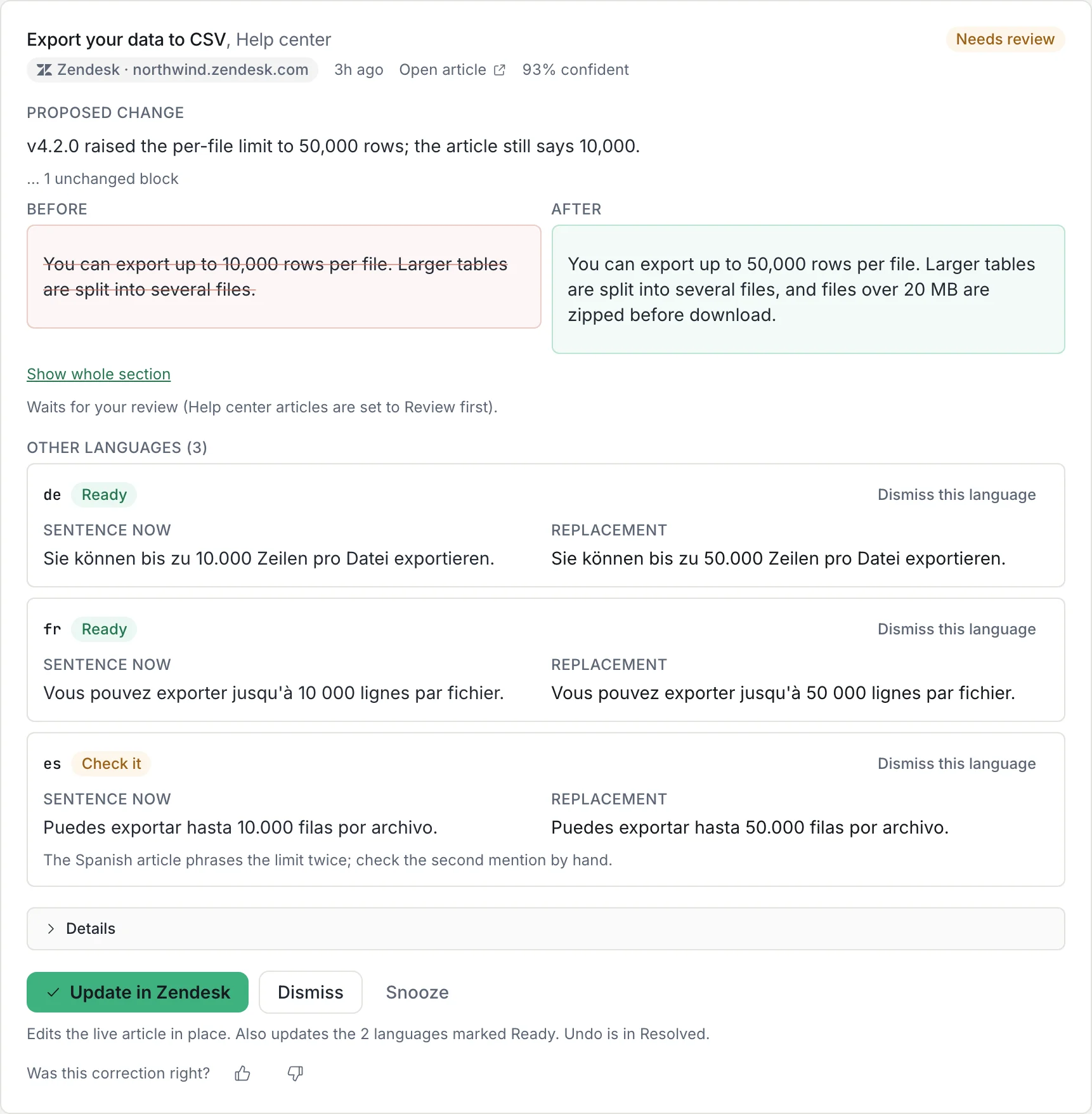
- Compare the old sentence, replacement and release evidence together.
- Check the surrounding steps still make sense, including UI labels, links and screenshots.
- Keep unrelated wording changes out of the correction so a reviewer can see what the release required.
- Check the live article before applying. If another editor changed it, rework the proposal against the latest body.
Finish the translations in the same pass
Track each locale separately. A correct English article does not establish that the German or French version gives the same instruction. Verify the changed value and the meaning of the translated sentence, then check each live result.
Keep any language that needs a translator visible as unfinished work. Do not treat a missing translation or a failed sentence match as an approval.
A checklist for keeping Zendesk translations current →Run the check from releases with Amendary
Connect Zendesk in Amendary, choose a GitHub repo or public changelog URL as the help center’s source, and watch the articles you want checked. Daily checks look for changes that make those articles stale.
Proposed corrections include the change behind them and per-language replacements for review. New teams start in Review first. Applying a correction edits the article body while preserving each locale’s published or draft state. A changed live body blocks the write; undo is available for 30 days when no later edit conflicts.
This covers proposed text corrections. Screenshots and the overall usefulness of the article still need a person to check.