Zendesk maintenance
How to keep Zendesk article translations current
Keep translated Zendesk Guide articles aligned after a release: track each locale, review changed values and handle missing or conflicting translations.
The English article is fixed. The French version still tells customers to use the old setting. A translation can read perfectly and still describe a product that no longer exists.
Treat a product correction as work across a set of article locales. Each language needs a visible outcome: updated, waiting for review, missing, or blocked by a later edit.
Keep the source change beside the translation
Before asking for new wording, establish exactly what changed. Keep the release evidence, old source sentence and accepted replacement together. A translator needs to know whether the task changed, the label changed, or only a limit changed.
In an illustrative export-history change from 30 to 90 days, every translated sentence must preserve the new duration. The rest of the article may need no translation work.
Review the instruction in every locale
Matching values are necessary, but they do not establish that the wording is right. A fluent reviewer should still check the meaning, especially for permissions, billing and irreversible customer actions.
- Confirm the replacement refers to the same product feature and customer action as the source.
- Check numbers, durations, versions, names and URLs against the release evidence.
- Use the label customers actually see in that localized product screen.
- Read nearby steps for an old instruction that the changed sentence now contradicts.
- Record the outcome separately for each language.
Keep missing and conflicting translations visible
If a target-language article is absent, record that as missing. Creating a new translation is a different task from correcting a sentence in an existing article. It needs review before publication.
If another editor changed the article while the correction waited, compare against the latest version. Do not overwrite their work with a replacement drafted from an older body.
When a sentence cannot be located confidently in a translation, inspect it manually. The translation may use a different structure, omit the passage or already contain the right instruction.
Verify what readers can see
After applying, open each updated locale in Zendesk. Check the sentence, links and nearby images. Keep the article’s intended publication state: a draft correction should not accidentally publish a draft.
Retain the old text and a record of why it changed. If you need to undo, check for intervening edits before restoring it. A rollback can overwrite newer work just as easily as the original correction.
How Amendary handles the language review
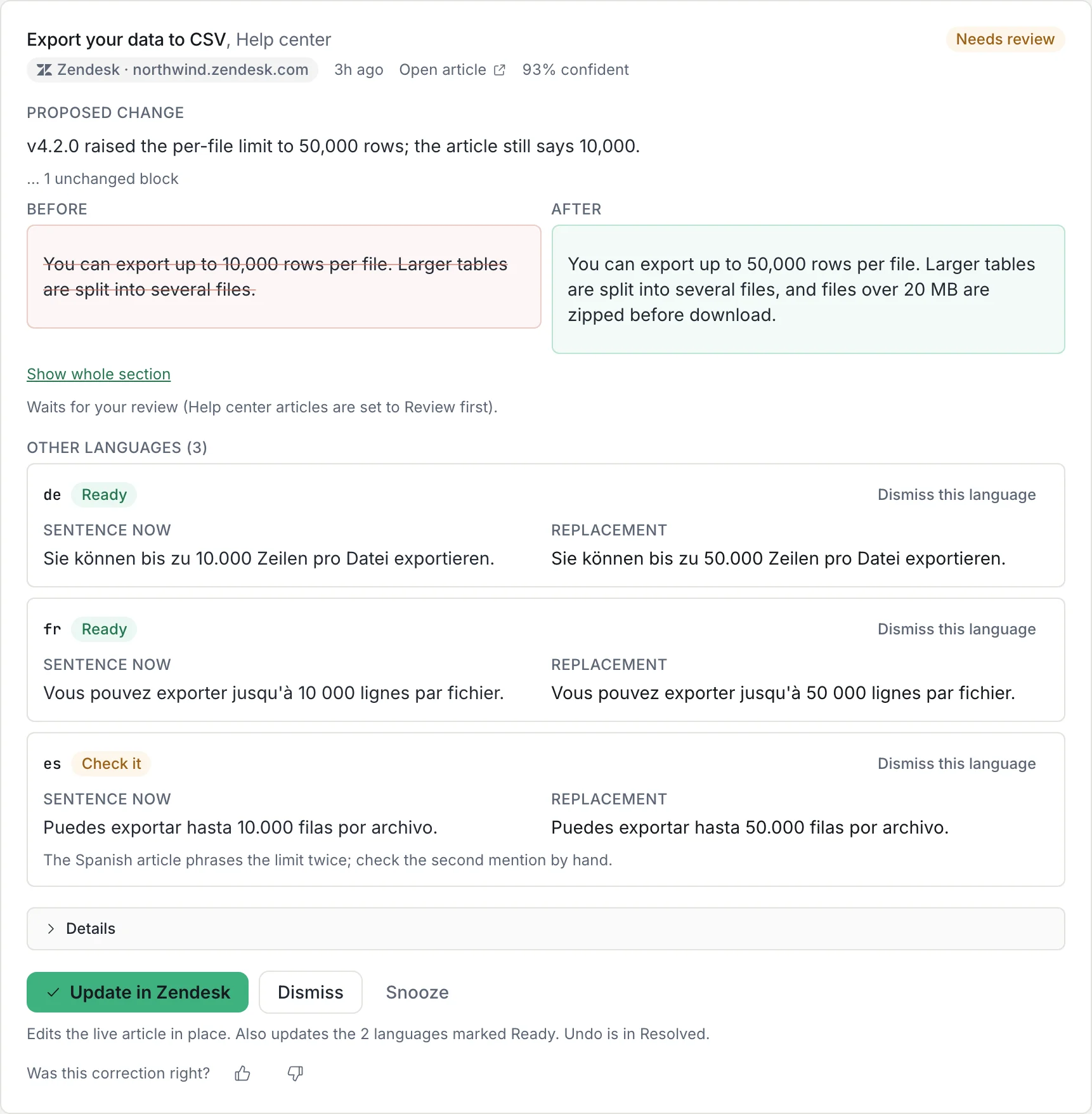
Amendary checks watched Zendesk source-language articles against GitHub changes or a public changelog. When it drafts a correction, it attempts the matching edit in existing translations and shows a row for each language.
Review the ready rows and investigate those marked Check it or Not found. You can dismiss a language separately. Applying updates the ready languages without changing their published or draft state. A later body edit blocks the write.
Missing languages can be drafted separately for credits and are saved unpublished in Zendesk. Applied corrections can be undone for 30 days, provided the relevant content has not changed since.